Web HostingBudget-friendly shared hosting plans
 Domains SearchFrom .com to unique country domains, explore and register extensions worldwide.
 WordPress HostingPower your blog or business with WordPress hosting.
 Email HostingSimple, secure email hosting that helps you stay connected and professional.
 Reseller HostingStart your own hosting business with easy and reliable reseller hosting plans.
 AffiliateJoin our affiliate program and earn commissions every time you bring in new customers.
 cPanel HostingHosting powered by cPanel, the world’s most user-friendly control panel.
 Windows HostingBuilt for Windows applications and websites
 IN Domain PricesDon’t miss out on the best domain deals in India!
 WHOIS LookupFind out who owns a domain name with a quick and easy WHOIS search.
 Domain TransferTransfer your domain to us and enjoy reliable support every step of the way.
 .Com DomainGet the most trusted domain for worldwide credibility
 All TldsSearch and register domain extensions worldwide.
 SSL CertificatesProtect your website with trusted SSL certificates and keep customer data safe.
 VPS HostingPowerful virtual servers. Full root access. Reliable uptime.
 Managed VPS HostingNot a tech expert? Choose our fully managed VPS service.
 Dedicated ServersTake full power and total control of your own physical server.
 AI Website BuilderCreate stunning websites instantly with our easy AI builder.
 Online ShopBuild your eCommerce store easily, no coding, just growth.
 Web Design ServicesGet a website built for your brand and designed for your goals.
 Contact UsReach out to us for support or questions.
 SupportGet answers and how-to guides for all our services.
 BlogRead our latest blogs on web hosting, online business, digital marketing, and other helpful topics.
You know that moment when an idea refuses to leave your head?
Maybe it’s a business, a brand, a side hustle, or just something you want to show the world.
And then reality hits you.
“I need a website, but I’ve never built one before.”
If that’s where you are right now, then don’t worry much. I’ve been there, with brilliant ideas sitting in my notebooks for months because I didn’t know where to start.
But here’s what I later discovered!
Building your first website doesn’t have to be scary. It doesn’t need coding. It doesn’t need design skills. And it definitely shouldn’t take weeks.
Not when you have an AI tool like Ollit that can turn a few simple answers into a fully structured website.
Today, I’ll walk you through exactly how to build your first website using Ollit, step by step, and how to avoid the mistakes I made when I started.
What Is Ollit AI Website Builder?
Ollit is like a friend who understands websites even if you don’t.
You tell it what your business is about, and it builds the foundation. Then, you tweak things, it improves, and now you hit publish.
That’s the whole rhythm.
In short, Ollit is an AI-powered website builder that creates websites based on your inputs and goals. It handles design, layout, copywriting, structure, and even light SEO for you.
That means, there are no coding, plugins, or templates that require you to have skills to know which one to use and where.
Instead, you answer questions, Ollit thinks, and gives you a ready website in minutes.
So, if you find yourself stuck even before you begin, building your site, Ollit the solution.
It takes away confusion on hosting, overwhelming themes, and saves time that could be spent on copywriting and editing website pages.
So, you are only left with one task. Launching your website!
How I Built a Website Using Ollit
When I use Ollit, I treat the process like assembling something simple. I gather ingredients, follow the flow, taste as I go, then serve the final dish.
So, you don’t need to overthink it. You just move step by step, as follows:
Step 1: Visit the Ollit AI Website Builder
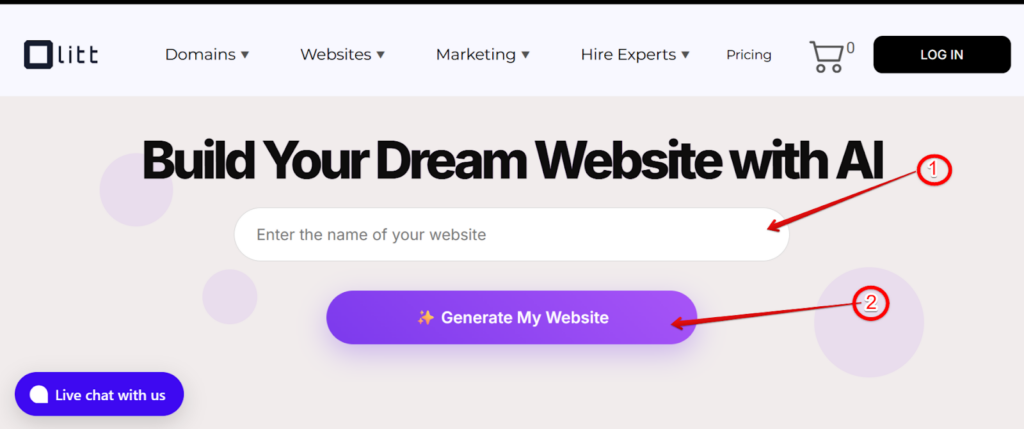
Start by going to Ollit. Then, enter the name of your website and click “Generate My Website.”
No complex dashboards. No confusing options. Just a clean button that leads you straight into the website creation flow.
You’ll feel like the platform is holding your hand. And honestly, that’s exactly what you want when building your first website.
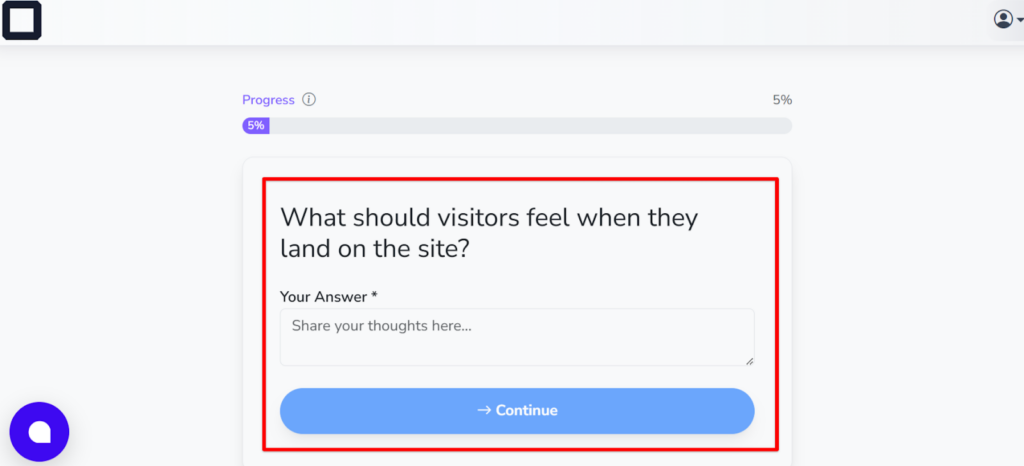
Step 2: Answer a Few Questions About Your Business
Ollit will ask questions, but not the intimidating kind.
For example, it will ask:
- What’s your business name?
- What do you offer?
- What’s the goal of your website?
- How would you describe your brand?
- Who do you want to attract?
The good thing is you don’t need long or 100% perfect answers.
Just be honest, like you’re describing your business to someone who genuinely wants to help solve an issue you’re having.
But remember, the answer you provide will help Ollit build:
- Your homepage layout
- Your color style
- Your content tone
- Your website structure
- Your images and recommendations
So, the clearer your answers, the better the AI-generated draft will be.
It’s like when instructing someone to cook your meal! Good instructions definitely lead to good results.
Step 3: Revise the Provided Details and Edit
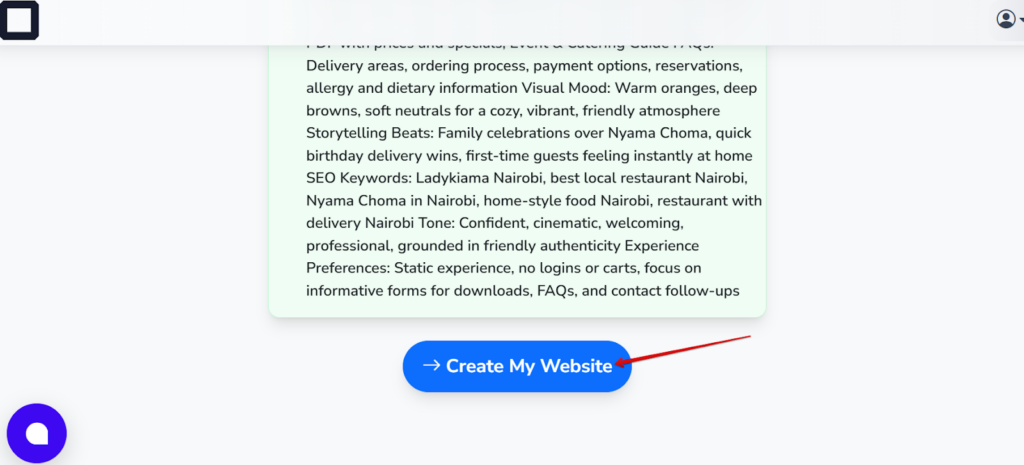
Before Ollit begins building your site, it shows you everything it has collected from your answers.
This is your double-check moment.
Here’s where you:
- Shorten a tagline
- Improve a sentence
- Add factual details
- Adjust tone from formal to friendly
The small tweaks here create a big impact later because Ollit uses this data in headers, body text, and CTAs.
So, if something feels off, fix it at this stage, as that saves you time during edits.
Step 4: Let AI Generate Your Website Draft
Now comes where magic happens!
You hit “Create My Website,” Ollit thinks for a moment, then… boom.
A full website appears.
Homepage, about page, contact page, products or services, images, and sections, all created from the details you gave earlier.
And congratulations, from your idea, you now have a draft of your website ready to go live.
Step 5: Customize the Website With AI Help
Now that you have your first draft, it’s time to shape it into something that feels like yours.
Ollit uses a drag-and-drop editor, so you can:
- Change sections
- Rewrite text
- Replace stock photos
- Add new blocks
- Remove unnecessary parts
- Adjust fonts
- Change buttons
But if you ever get stuck, you can literally highlight text and ask the AI:
- “Make this more friendly.”
- “Rewrite for clarity.”
- “Give me 3 headline options.”
- “Shorten this.”
It feels like having a content editor on standby.
Step 6: Add AI-Powered Content, Images & Product Descriptions
This is the part where Olitt saves you hours.
You don’t have to sit staring at your website draft, not sure what to add or remove.
You tell the AI what you need, and it generates everything from blog posts, product descriptions, service explanations, FAQs, taglines, captions, and even your meta descriptions.
But here’s the mistake most beginners make: they rely entirely on AI.
Don’t.
Add a few real images, your face, your product, and your workspace or store. Those small touches instantly make your website feel human and trustworthy.
Step 7: Refine Your Brand Identity
This is the moment you make your site stop looking AI-generated and start feeling like you.
So, choose your colors, your fonts, your voice, your logo, and the overall tone you want people to feel when they land on your site.
If you don’t have a logo yet, Olitt can suggest simple options, or you can start with a clean wordmark.
The goal is to keep everything consistent, such as the same button color, the same call-to-action, and the same writing style.
Step 8: Optimize for SEO, Marketing & UX
This is the step most first-time builders skip.
But don’t make that mistake.
A website without visibility is basically an empty shop in the desert, and you can avoid that by personally fixing it with the help of Olitt tools.
Here’s how:
Start by tightening your SEO. Add clear page titles, write proper meta descriptions, add alt text to your images, keep your URL slugs clean, and make sure your headings follow a logical structure.
Next, set up your essentials. Connect Google Search Console and Google Analytics, check your mobile design, and compress your images so the site loads fast.
Then move into marketing. Add an email form, link your social accounts, place strong CTAs, and connect your custom domain so your brand looks real.
Finally, think about user experience.
Ask yourself, can someone navigate easily? Can they find your contact info fast? Does everything look good on a phone? Do the buttons actually stand out?
Once you fix all these, then you’re ready to move to the next step.
Step 9: Confirm All Is Well
Before you publish, pause and do a quick audit.
Read through every page, looking for spelling slips, grammar mistakes, broken links, or forms that don’t submit.
Also, tap every button, scroll through the mobile view, make sure images aren’t stretched, and spacing doesn’t look awkward.
This part feels small, but it saves you embarrassment later.
Personally, I always ask one friend to test the site because fresh eyes catch things you’ll never notice on your own.
Step 10: Publish
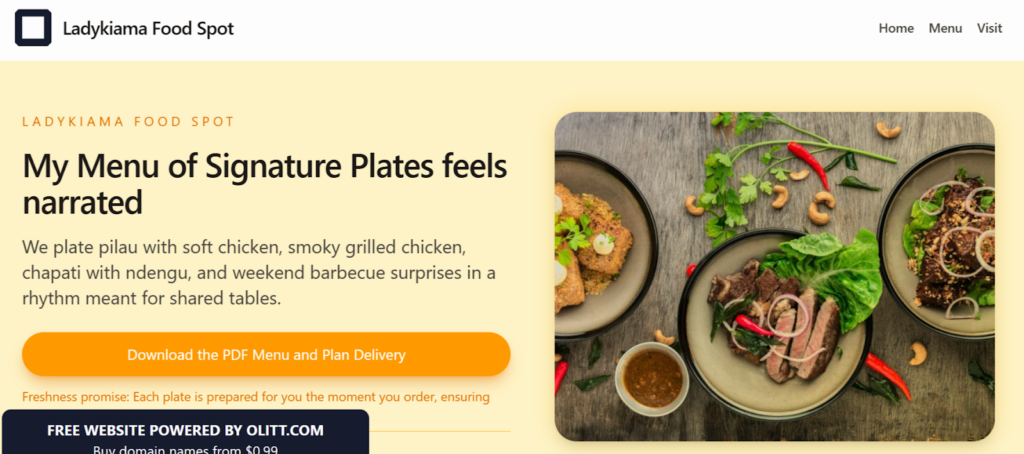
This is the moment you’ve been working toward.
Hit publish, connect your domain, take a breath, and let it sink in.
You’re officially a website owner.
It feels surreal the first time, but also incredibly empowering.
And remember, nothing needs to be perfect today. Olitt makes updates fast and painless, so you can adjust anything later.
Advantages of Ollit Over Other AI Website Builders
One of the biggest advantages of Ollit is speed.
You can go from zero to a fully structured website in just a few hours. In short, the AI handles the heavy lifting, giving you a draft you can edit and publish almost immediately.
Another standout feature is ease of use.
The Ollit interface is beginner-friendly and intuitive. You don’t need to understand coding, hosting, or complicated settings.
The AI guides you through every step, from generating content to refining your brand, so you always know what to do next.
Other advantages include:
- Affordable plans that won’t break the bank
- Clear AI-guided setup for quick site creation
- Integrated SEO helpers to make your pages search-ready
- Drag-and-drop editor for instant customization
- Useful content generation tools to save time
- No steep learning curve for beginners
In summary, Ollit is lean, simple, and focused on what both first-time and experienced website builders actually need.
Disadvantages of Ollit Compared to Other AI Builders
Ollit is still relatively new, and because of that, it hasn’t yet built a large user base.
There are limited reviews online, so finding detailed experiences or case studies can be tricky for first-time users who want reassurance.
Another point to note is that Ollit is designed for simplicity and speed rather than advanced features.
So, it may not have all the deep integrations or plugins. Of course, this is not a big problem if you’re building your first website, but it does mean some very specific or complex needs might not be fully covered.
Even so, for beginners and small projects, these limitations are minor.
Keep in mind that Ollit is best suited for straightforward sites where speed, ease, and guidance are the priority.
Final Thoughts
Your first website is more than just a page online. It’s your identity, your proof, your voice, and your presence.
So, building it shouldn’t feel like climbing a mountain.
With Ollit, you’re not wrestling with technology. You’re working alongside it, guided, supported, a nd empowered to translate your idea into a full website in minutes.
There is no wasting time fixing code bugs, dragging templates, or integrating themes that feel overwhelming to comprehend.
Instead, it’s like a Q&A session that magically turns your answers into a complete website.
Ready to build your first website? Visit Ollit now and get started. It’s simple, easy, and fast.